Apple’s Accessories Lineup Autumn 2017

Ever since a few years ago, Apple has been putting massive efforts into their accessories, realizing that accessories are a massive cash cow.
While their iPhone/iPad cases/covers might not offer the best protection, they are definitely some of the most well-made products on the market.

While the iPhone X stole the thunder of the September event, there is also a lot of excitement from Apple Watch owners, especially those who collect Apple’s own first-party watch bands, for this season’s watch band line up look to one of the more interesting ones in recent memory.

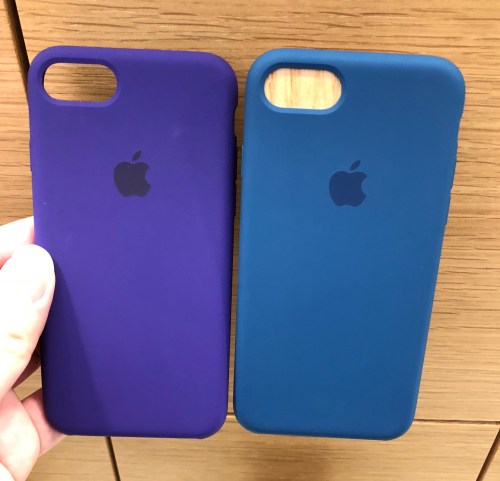
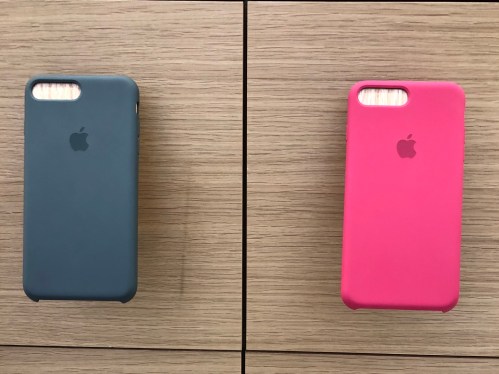
I paid a visit to Apple Orchard last week, hoping to check out the Ultra Violet accessories in person and my, they did not disappoint. Apple’s accessories have had a tendency to be offered in muted or less exciting colors, but Ultra Violet was like, “WOW”.

The Apple Silicon cases for the iPhone 7/8 Plus were especially tempting as they offer a lot of Ultra Violet “WOW”ness for less money than the Apple Watch bands ($58 vs $78).

One thing I did not expect was how nice Blue Cobalt actually looked. The color did not look interesting at all on Apple’s site, but in person (and the right lighting) it definitely looks like one of the best blues Apple’s ever offered for their accessories.

Besides the Sports bands, Apple also introduced the Sports Loop into the Apple Watch band lineup. For old timers who remember the very first Casio Baby Gs decades ago, these offered probably the same style/feel. And while they are definitely not as bright or striking like some of the Sport Band colors, they are really comfortable.

The question ultimately is, how many watch bands does one need?

I also managed to check out the two new colors that the Beats X is now offered in (muted silver and muted gold), and while they looked interesting, I have to say I much preferred my blue pair. The old four colors which are now discontinued are being heavily discounted on Amazon and other online outlets from time to time, so it will be a great time to snatch a pair if you do not have one yet!

PSA: Don’t Upgrade to WatchOS 4 if you use your Watch to Control Music Playback

If you use your Apple Watch as a remote to control your phone’s music app, do not upgrade to WatchOS 4.

This has actually been in the WatchOS 4 betas since the very first one, but I did not catch it until very recently because I could not be bothered to load the WatchOS betas on my Apple Watches since in my experience, they tend to be unstable and will “brick” your Watch if something happens during the installation/updating process.

To clarify what is going on here, Apple has made delibrate changes to the Music app in the Apple Watch in WatchOS 4, such that you are no longer able to select the source of the music controlled through the app.

In other words;

This.

The above function is now gone and you can no longer select the music source between the phone and the watch.

Why does this matter?

There is only 8GB of storage in the Apple Watch, out of which only a portion of the storage space can be used for syncing music into the Watch. Therefore it does not make much sense to sync music into your Watch, but rather as a controller for your phone’s music in the situations when you have no physical access to your phone.

Me myself, I love (and still do) controlling my phone’s music, selecting the specific song/artist/playlist through the Watch during peak hours in the mornings and evenings when I am usually not afforded the space to put my hand into my pocket to pull out my 7 Plus but still want fine grain control of the music playing in my Beats X (that is connected to my phone).

With WatchOS 4, you can now only play music that is synced to your Apple Watch or, with LTE service from your Apple Watch Series 3 Cellular, stream (and PAY FOR) Apple Music. So it is either I sync a (very small) bunch of music into my Watch, force the Beats X to connect to them rather than connect to the 7 Plus, and control my music from there, or I control my music solely from the phone and resign to just play/pause/skip functions on the Apple Watch’s Now Playing app in WatchOS 4. Which is useless since I have the same controls on my Beats X.

Having bought a launch day Apple Watch (on the worldwide launch day, not Singapore’s), I have seen WatchOS progress from the crap it was on Day 1, to the almost-perfect WatchOS 3. Seems like with WatchOS 4 they are taking some steps forward (like the recently announced heartrate monitor app improvements) and some steps backwards. Kevin Lynch has always been an idiot (and I believe the sole reason behind why progress on WatchOS was so slow and so filled with bad ideas) and it shows.

And this is not everything that is bad about the Apple Watch this October. I have a much larger rant about the Series 3 that was just announced, but I will leave that for a later post.

Some forum postings regarding this issue can be found below;

WatchOS4 totally ruined the Watch for me !! what the hell apple !!
and
Watch OS 4 Beta 1 – Music app doesn’t connect to iPhone library
and
Reddit: Support QuestionCan I still choose my music source with watchOS 4?
among others.

Apple Watch Edition (in real gold and rose gold) on Sale at Apple Watch Shinjuku Isetan

Apple Watch Edition

I found out about this a few weeks ago, and I guess it will be mean of me not to share this.

If, for some reason, you are looking for a SERIES 0 (first release in April 2015) Apple Watch Edition in REAL Gold and Rose Gold, and happen to be in Japan, Apple Watch Shinjuku Isetan (the store) is having a secret sale on them for 70% off, with the final price around 400000 yen (around 3600USD), while stocks last.

You will have to speak directly to the sales people about those, there is no signage or banner indicating the sale at all. It is a secret sale for a reason.

If you crave a Apple Watch in real gold, and don’t mind the fact that the innards are the slow Series 0/S1 System-on-a-chip, then don’t miss the chance to get what is probably the first and the last Apple-made gold watch.

The Apple Watch “Mushy” Digital Crown Hardware Problem

The Digital Crown Problem

This seems to be a problem especially with certain models of the stainless steel version – namely the Apple Watch (stainless steel) with Black Sport Band.

On online forums many owners of the above mentioned model of the Apple Watch found that, upon unboxing, their digital crown feels a bit weird – pressing it feels soft, and without the “clicky” feedback one gets from pressing the contacts button – almost like a used, worn out home button on an iPhone.

Turning the digital crown also is not a smooth process, sometimes the crown will get stuck, sometimes it requires more than the usual force to push the crown – nowhere near as smooth as how the digital crown should feel.

Many at first put it down to several possible theories – different materials used for the stainless steel version; dried up sweat clogging up the digital crown, etc. But mere testing of other stainless steel models have proven that the mushy digital crown is definitely isolated to only some, and other stainless steel models have clicky digital crowns just like all the Sport models. Neither is dried up sweat a good explanation for something that didn’t work right out of the box, and following Apple support document of running the digital crown under water while furiously turning and pressing it does not solve the problem either.

Many overseas have already successfully gotten replacements for their malfunctioning digital crowns.

I have the same model.

I have had the same mushy digital crown issue since day one, but as the Watch was purchased overseas, there was no way I could send it in for servicing until now, when the local servicing options opened up upon the launch of the Watch locally.

I called up Applecare, told them my problem, received a case number, a referral to a local service provider (A.lab), and a promise that the watch would be replaced upon successful confirmation of the issue by the service centre.

But A.lab is notorious for being difficult with their customers for repairs – it really stinks that micro2000/eServ lost the tender for servicing Apple products.

My appointment is in thirty minutes. Wish me luck.

P.S. If you have a less than ideal digital crown, go to the service centre today.

P.P.S. They accepted my watch and said they will send it directly to Apple for them to check and assess. Hope this goes well.

Just wanted to add here, the problem with the digital crown has been there all along, and I always planned to send it in when Apple started supporting the Watch in Singapore. The watch is still very usable all these while despite the faulty crown, and I try to avoid pressing the crown since the main use of presses is for accessing the app home screens, and third party apps on the Watch are still pretty shitty and slow due to Watchkit 1.0. This will obviously change when watchOS 2 rolls by in a few months’ time.

Apple Watch Prices in Singapore

These are the official Apple Watch prices. All prices are in Singapore dollars. As previously revealed, prices are off from the rumored ones by $40 to $50.

Apple Watch Sport

38mm – $518
42mm – $598

Apple Watch (Stainless Steel)

i. Stainless Steel Case with White/Black Sport Band

38mm – S$798
42mm – S$878

ii. Stainless Steel Case with Milanese Loop/Classic Buckle/Leather Loop (42mm only)

38mm – S$948
42mm – S$1018

iii. Stainless Steel Case with Modern Buckle (38mm only)

38mm – S$1088

iv. Stainless Steel case with Link Braclet

38mm – $1388
42mm – $1458

v. Space Black Stainless Steel case with Link Braclet

38mm – $1528
42mm – $1598

Wondering which watch to buy?

Here is my review of the Apple Watch after wearing it for two months.

Two months with the Apple Watch

When the watch was first announced to launch in only several countries that excluded Singapore, I was slightly upset but for the first time in many years, I did not feel an absolute need to get the Watch on launch day.

I have owned a Pebble since when they were on Kickstarter, and thanks to the bad customer service and the cheap looking watch body, and the constant need to recharge the watch, I gave up wearing it after a few weeks. I did not know if the Apple Watch will be any different, and the biggest features that was announced like the health related stuff really was not what an obese guy like me wanted in life.

I resigned to my fate and decided to wait for a Singapore launch.

Then somehow I got a chance to purchase some Apple Watches for launch day, and bought a Space Grey Sport and a Apple Watch (Stainless Steel) with Black Sports Band. The Sport I gave to my brother, the nicer one I kept for myself.

And I started wearing the Watch.

At first I would only wear it when I go out of the house, and try to keep the Watch safe if I was going to be in a situation where I would be rough doing work. It was, after all, the first time I own a 800-dollar watch. Then I started wearing it more and more. Even on days when I don’t leave the house. Even when I enter the shower. Sometimes even when I sleep. It just felt natural because the Black Sport Band is so comfortable when you put it on that it hardly feels like a watch on your arm.

It was convenient after all, I could take calls anywhere in the house even when I was away from my iPhone (it works over wifi), I could text friends through dictation, see my emails and decide if they were important or urgent enoguh that I need to get up from the sofa and walk into my room to reply, send my friends stickers over Line, run some Automator-ish workflows from Workflow, and even add reminders to my phone as and when I remember something in any part of my house.

One function that I did not anticipate using much was the heart rate sensor function/Glance. It informed me that I have a high resting heart rate, and I started monitoring my heart rate measurements using the Health app on my iPhone, as the watch will automatically record the measurements and send them to your phone. The Activity Glance, which I did not anticipate that I will even use, turned out to effective enough at forcing me to clear some of the easiest goals set by the app on default, daily.

Notifications. Need I even explain how this can literally be why anyone will purchase a Apple Watch? Fine tuning the kind of notifications you receive on your watch is absolutely necessary, right from the get on. You should only set to receive notifications from important apps and turn off stupid notifications like say, from games or other spammish apps you have on your phone. And it never fails to tap you on your wrist everytime a notification comes in, even if your phone is in your bag, or if you can’t feel the vibration of the phone in your jeans’ pocket.

When you receive a notification, if you mute the watch, no one else will know that a notification came in except for you yourself, for the screen will NOT light up, unless you lift your arm to read the message. Which means that it is not going to affect you in your important meeting when some idiotic friends of yours suddenly started spam messaging you to sob about their sad sad love story. You’ll feel her sadness on your wrist, but no one else will realise that (so long you do not keep lifting your arm to read the messages).

Charging is so simple, you literally just plug in another cable (to a usb charger) next to your iPhone, and when you charge your phone for the night you just charge the watch next to it as well. Battery life does last way more than an average day but unlike the Pebble, there are so many things that you want to do with your watch everyday that charging it daily is not a chore. Not to mention how the shitty charging cable Pebble has keeps falling off the magnetic contacts everytime you lightly touch it – the Apple Watch’s magnetic charging cable fits snugly but does not require much torch to separate it from the watch in the morning.

There are so many things more I can say about this lovely “device” that I put on my wrist everyday – how much easier it is to put on compared to a normal watch band after you get the hang of it, how inconspicuous it is (despite wearing it around for 2 months only three people noticed the watch, and that was because I was playing with it) if you select one with a band that is not the Pink, Blue or Green sport band, so it works well for professional work places as well, etc, etc, etc.

I Will be getting more bands for my Apple watch. Probably the Pink Sport Band since the Sport Bands are so comfortable.

I love my Apple Watch.

Which Apple Watch to buy – Sport or Stainless Steel?

This is not a article on whether you should buy a Apple Watch or not – there are already plenty of those.

This is about the difference between the Apple Watch (Stainless Steel) and the Apple Watch Sport, and if the difference is worth the extra money.

Note: When I talk about the “Apple Watch”, I am referring to the stainless steel model. The Apple Watch Sport will be the “Apple Watch Sport” or just simply the “Sport”.

I am not going to talk about the Edition. If you are in the market for a gold watch, you should just get the Edition. Otherwise, for the rest of us mere mortals, our only choices are the Apple Watch Sport, and the Apple Watch (Stainless Steel).

Having had a stainless steel model (with Black Sports Band) since the launch day in April, and having prolonged exposure to the Space Grey Sport model (as my brother has one), it is obvious to me the difference between the two, and you slowly get to appreciate the benefits of each model.

The reflective look of the polished stainless steel body gives the Apple Watch (Stainless Steel) a much more refined look

The stainless steel body of the Apple Watch gives it a refined, polished high-end look, not unsimilar to many of the expensive watches out there, even with the cheapest black or white sports band.

On the other hand, the silver aluminium models make the Sport models look like Swatches (which is not a bad thing in itself), and have a obvious sports-look that may not be as presentable at formal events or in certain lines of work.

The Apple Watch (Stainless Steel) has heft

The heft of the Apple Watch compared to the (comparatively) weightlessness of the Sport actually gives it a better feel, especially if you are the type who prefers watches with decent heft, like many chronograph models. That said, if you are the kind of person to be bothered by a heavy piece of metal weighing you down throughout the day, the Sport will suit you better.

Sapphire > Ion Glass

The difference of the Sapphire cover “glass” on the Apple Watch can actually be felt, and it really is indestructible. Several knocks on the sapphire cover glass have produced zero scratches, while according to the rest of the Internet, the Ion Glass cover glass on the Sport, while strong (same glass as the iPhone 6), is still prone to scratches.

However, the Stainless Steel body of the Apple Watch is more prone to scratching than 7000-series aluminium used in the body of the Sport. If you are interested in purchasing a silicon cover/protector for your Apple Watch/Sport’s body, there have been reports of millions of micro-scratches on the stainless steel models resulting from the trapped dust rubbing against the stainless steel body, so these silicon covers will work better on the Sport models than the stainless steel ones.

That said, it is relatively enough to buff the scratches out on stainless steel, as watch repairers have done for as long as stainless steel have been used to make watches.

With the exception of the Sport bands and the Leather Loop, all other bands are fit to look right only with the Apple Watch (Stainless Steel)

As the lugs for bands like the Classic Buckle and the Milanese Loop are stainless steel, they will look most right on the stainless steel models as compared to the Sport models, even though there are no physical restrictions to swapping stainless steel lug-equiped bands onto the Sport, they just look better on the stainless steel body of the Apple Watch.

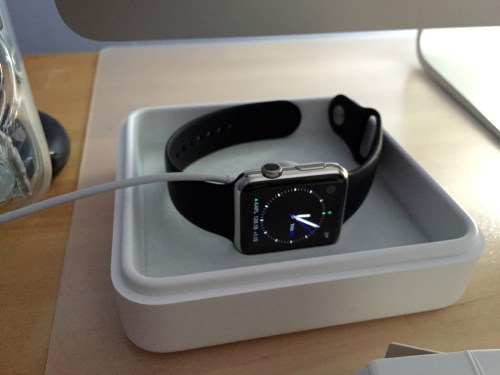
Then of course there are the niceties like the nicer jewellery case that comes with the stainless steel models, as well as the metallic magnetic charger as opposed to the plastic ones that comes with the Sport models, all of these makes having the Apple Watch (Stainless Steel) a slightly nicer experience as compared with the less-expensive Sport. (But with the Sport you get to save quite a bit of money!)

Of course, the Sport models are no slouch, and they function exactly the same (even though the internal construction of the Sport models and the stainless steel models are different, thanks to the dismantling pics from ifixit) with no difference in capacities and speed compared to the more expensive stainless steel models.

Besides, like many others on the various apple forums who have regretted their original purchases and decided to upgrade to stainless steel models, so long you purchased the Apple Watch from the Apple Online Store, there is a 14-day return policy which you can make use of to swap to a model that you prefer. Of course there’s the enhanced wait for the replacement, but it beats getting stuck with the remorse of buying the less than perfect model.

You can take a look at the (pretty amateur-ly done) unboxing video that I have done here.