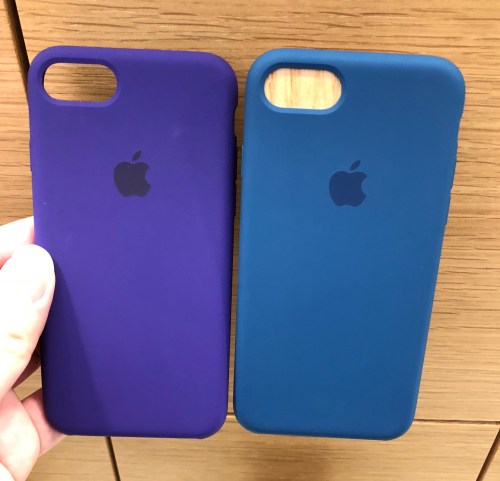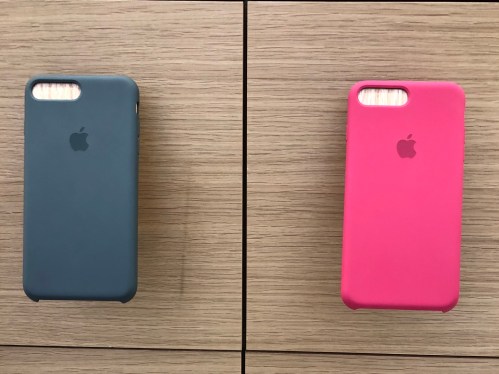
First Look at the Purple iPhone 12 and the Spring 2021 Apple Accessories

Untitled

Untitled

Untitled

The shade of purple on the new Purple iPhone 12 is just such a fantastic color. In the whole iPhone 12 and 12 Pro lineup there is no other color that comes close to it. As mentioned in a previous post, if Apple had released this color on launch day I would not have picked blue for my iPhone 12 mini. The blue for the 12 mini is decent, but it is way too dark for my liking. I prefer something brighter or visually more striking than a dark shade of blue for my main iPhone. As far as blue on iPhones go nothing has beaten the blue on the iPhone XR even today.

Untitled

But Apple also just released what was probably the best shade of blue for its accessories since they started making accessories seriously half a decade ago.

Untitled

Capri Blue, which is probably best described as a more saturated version of Surf Blue, is my favorite shade of blue that Apple has released so far. It joins Amethyst as the most popular colors for official accessories this season.

Untitled

Untitled

Untitled

Untitled

Unlike Amethyst, however, Capri Blue is available on the Apple Watch Sport Band as well, so it is a double whammy of accessories to buy for blue lovers this time around.

Untitled

Untitled

Amethyst, along with its leather variant Dark Violet, was released to compliment the Purple iPhone 12 and 12 mini, and looks superb, probably only the second best purple Apple has ever released for accessories, after Ultra Violet a few years ago. Dark Violet, on the other hand, is disappointing. Purple dye on leather is probably way too hard to do correctly.

Untitled

Untitled

I also managed to take a look at the various official AirTag accessories, including the Hermès ones. I have to say, they do not feel any different in quality from the Apple leather accessories, and unless you really want Hermès, the official Apple ones will feel as premium.

Listen to my discussion of the latest Apple accessories on my brand new podcast, the MacRyu Podcast, available on the following platforms.

Apple’s Accessories Lineup Autumn 2017

Ever since a few years ago, Apple has been putting massive efforts into their accessories, realizing that accessories are a massive cash cow.
While their iPhone/iPad cases/covers might not offer the best protection, they are definitely some of the most well-made products on the market.

While the iPhone X stole the thunder of the September event, there is also a lot of excitement from Apple Watch owners, especially those who collect Apple’s own first-party watch bands, for this season’s watch band line up look to one of the more interesting ones in recent memory.

I paid a visit to Apple Orchard last week, hoping to check out the Ultra Violet accessories in person and my, they did not disappoint. Apple’s accessories have had a tendency to be offered in muted or less exciting colors, but Ultra Violet was like, “WOW”.

The Apple Silicon cases for the iPhone 7/8 Plus were especially tempting as they offer a lot of Ultra Violet “WOW”ness for less money than the Apple Watch bands ($58 vs $78).

One thing I did not expect was how nice Blue Cobalt actually looked. The color did not look interesting at all on Apple’s site, but in person (and the right lighting) it definitely looks like one of the best blues Apple’s ever offered for their accessories.

Besides the Sports bands, Apple also introduced the Sports Loop into the Apple Watch band lineup. For old timers who remember the very first Casio Baby Gs decades ago, these offered probably the same style/feel. And while they are definitely not as bright or striking like some of the Sport Band colors, they are really comfortable.

The question ultimately is, how many watch bands does one need?

I also managed to check out the two new colors that the Beats X is now offered in (muted silver and muted gold), and while they looked interesting, I have to say I much preferred my blue pair. The old four colors which are now discontinued are being heavily discounted on Amazon and other online outlets from time to time, so it will be a great time to snatch a pair if you do not have one yet!

Happy 10th Birthday, iPhone

iPhone Original

I still remember the day I was sitting in my room, at my desk, watching the keynote and calculating how long would I have to save in order to afford the phone should it come to Singapore eventually (roughly 7 months, I was a student then).

Many months later when it seemed like the iPhone will not be coming to Singapore anytime soon I started exploring the possibilities of buying an iPod Touch instead, for it was running “iPhone OS” albeit with several restrictions like the inability to edit calendars on the iPod (they reversed that stupid decision very soon after the iPod keynote).

Then I finally saw it in person.

My friend Roger, had one and I remembered meeting him just to have a look at the phone. There I was, sitting outside McDonald’s at Bugis Junction, looking at this unbelievable device – supposingly a phone, but unlike any phone I knew then. It has such a bright display that it looked out of this world, for until then there was no such display in the world. The reaction to touch was instantaneous, and NOTHING with a touchscreen up till that point was as responsive as the iPhone’s display was.

It was, to put it simply, MAGIC.

I would eventually come upon a chance several months later to own one of the original US sets, thanks to a friend’s aunt who worked in an airline and flew to the US often back then.

Even though it now has a dent at one of its corner, and iOS 3.1.3 is as slow as hell on its hardware, it still sits proudly on my shelf in its dock(that came in the box!).

The original iPhone, is still my favorite iPhone.

Thank you Steve, and thank you Apple, for this wonderful gift to the world.

Sent from my iPhone

iPhone 7? Maybe not

For all it is worth, early rumors of the next iPhone are showing something different about Apple’s strategy this time round – iPhone 7 might be the iPhone 6ss.

Nothing says more about a new iPhone being “new” than a need to buy a new case for it.

Right now the rumors are;

  1. Same industrial design (aka phone body shape and size) with the exception of redesigned antenna lines

  2. Dual-lens cameras on a brand new iPhone Pro, which will be the higher spec-ed model of a iPhone 7 Plus

  3. Will underwhelm. LOL.

Kind of a bummer.

Well, it is not like real iOS people are going to jump ship to Android all of a sudden, and the random customers who do will eventually come back when a nicer iPhone comes around in a few years’ time, so no big deal I guess.

MacRyu’s Mac Setup 2014

So in 2007 I posted my old setup based around my 2007 24″ Aluminum iMac and 12″ iBook on Flickr.

Then in 2011 I posted my revamped setup based on the same iMac but with a relatively new 2010 MacBook Air.

After another 3 years and spending the last 12 months not bothered with updating this site, I want to reboot this site with my first decent post – my current Mac setup.

And here it is.

2014 Mac setup - 1

The iMac, now in its seventh year of service, has been semi-retired and is only used sparingly these days. Its main duties have been taken over by the 2012 11″ MacBook Air, which is connected to a Crossover 27″ high resolution monitor (2560X1440, LG’s IPS panel, the same ones used in the current 27″ Thunderbolt Display) via Dual-link DVI, which I run in clamshell mode for the time being. It will be eventually replaced by the next Mac Mini, whenever that thing is refreshed, because running clamshell mode can be a pain in the arse for long term use.

2014 Mac setup - 2

The iMac is these days used as a BT machine, iTunes server or for casual file access when I don’t want to turn on 4 switches just to access or print a file. It has been upgraded with a OCZ SSD last year, and boots into Mavericks in about 6 seconds flat, which is extremely speedy for a 7 year old machine. It is also connected to my HDD docks for serious backing up duties.

2014 Mac setup - 4

The Harman Kardon Soundsticks III is the world’s favourite computer speakers (they are almost always in every celebrity’s home or desks, just watch TV!) and I finally saved enough to get them last year. The iPad mini stand was a real replica of the see-through acrylic ones found in authentic Apple Stores, and was a gift from my brother a few weeks ago. Also on the table are docks for my iPhones (the 5S is being used to take the photos, that is why it is not in its modified Belkin dock), iPads, and other pieces of tech toys including the PS Vita 2002, Cowon Z2, Nexus 4 and the Xiaomi Note+. Oh and I love my Starbucks Reserve Mug.

2014 Mac setup - 3

Yes, those are the Sony consoles hiding in the dark corner.

Hopefully this site will still be around in 2017, when I will (most probably) post my updated Mac setup again.

Follow me on twitter @ryuworks or @macryudotcom (official account for this site). And join MacNet at http://sgmac.net for all Apple related discussions on FB!

Singtel, Starhub, M1 Prices for iPhone 5s and iPhone 5c revealed!

Finally the last two telcos revealed their prices for the new iPhones. Below are the price comparisons at the various plans. Images sourced from HWZ. Click on the images to view in full size.

Got questions about iOS 7 and the new iPhones? Visit sgmac.net today!

The iMessage Flaw (aka the iMessage Bug) Detailed and Explained (mostly)

Man, this is going to be really long. How should I start?

So Apple introduced iMessage with iOS 5. Just like iOS 5 itself, there are, rather than calling them bugs, what I will term inconsistencies or ideas that aren’t very well thought-out before execution all over the OS, and iMessage’s authentication process is one of those.

iMessage itself is a wonderful idea, it relies on data only, is completely integrated in the what most think of as the SMS app, and most of all, is completely transparent to the clueless user.

You get your iPhone 4S (or any other iPhones capable of running iOS 5), pop in your sim card, your sim card then discreetly sends an SMS to Apple to register your phone number on iMessage’s servers, and from then on every time you try to SMS another iOS 5 user you wonder why the text bubble turned from green to blue. “Ah, maybe this iPhone is smart enough to detect which of my friends are cool as blue and which are green and boring”, you may think. And then you wonder why you are billed for 20 SMSes instead of the usual 5000 SMSes at the end of the month.

iMessage, therefore, really works, in typical Apple fashion, seamlessly.

Or does it?

For those in the know, iMessage works not just with your phone number, but with any email address-based Apple ID as well. If you set the iMessage Caller ID on your iPhone as your Apple ID instead of your phone number (non-iPhones can only use Apple IDs as Caller IDs), your iMessage conversations will magically duplicate themselves across all your iDevices (with the same Caller ID), including all your spare iPhones, iPod Touches and iPads (and your Macs too, with the new Messages.app beta). This is wonderful, for you can start a conversation on your iPhone and continue on your iPad. The confusion sets in when you, like others, by default, set your iPhone’s iMessage Caller ID to your phone number and start wondering if Apple’s advertising if iMessage as being able to sync across devices is bullshit. But then, this is a topic for another day.

In recent months there’s been reports about iMessage “malfunctioning” by sending messages to wrong parties or going missing, but most of those reports only painted a picture of the “symptoms” without going anywhere near addressing the real cause of these “symptoms”. Others, like theives-blog Gizmodo, only used the chance to throw shit on Apple. Too bad they don’t have any credibility left for anyone to believe their bullshit.

iMessage, however, does have a few problems stemming from their authentication and “pushing” process, and I will attempt, from the very limited knowledge I have, to detail what is happening and explain why.

I have personally tested iMessage extensively using a combination of phones and sim cards and below are the three scenarios I have encountered often. The phones I am using are the iPhone 4S which is my main phone, the Galaxy Nexus my spare phone, and another iPhone 3GS. I am using 3 sim cards, let’s call them Singtel, Starhub and M1 (which really are Singtel, Starhub and M1 sim cards). The Singtel is my main sim card with a 9-number, and the M1 is a prepaid sim card with a 8-number. The Starhub is a DATA-only sim card with a 8-number.

What are the possible problems?

Situation 1

I have been using the Singtel sim card in my iPhone 4S since the day I bought the phone, and iMessage is obviously activated with the Singtel 9-number. Recently I decided to test out ICS and switched out the Singtel sim card and started using it with the Galaxy Nexus. However, there is absolutely no way I can get any work done on Android with its crappy third party apps so I needed my 4S as well. To ensure it works properly I inserted the DATA only Starhub sim card into the 4S, without rebooting the phone even once. This causes a strange situation. Under Settings>Messages>Receive At, listed at the top is “Verifying 9-number(my Singtel sim)” and at nowhere is the Starhub 8-number listed there despite the Starhub sim card being inside the 4S at that very point of time. “Maybe iMessages sent to my Singtel 9-number will just fail and default to SMS then, since the 9-number isn’t verified”, or so I thought. Over the next few days, many have came up to me and asked why I didn’t reply their messages. I simply didn’t receive them on the Galaxy Nexus, which at that point of time was holding the Singtel 9-number sim card. I didn’t even receive them on the iPhone. I then reinserted the Singtel sim card into the iPhone, reactivated iMessage under the 9-number, but the messages never came through. They were all blackhole’d, sent to a dimension where humans don’t exist.

Situation 2

I was setting up my old iPhone 4 for my mum one day by restoring it through iTunes. When the activation screens came up, I just inserted my Singtel sim card to get through the activation screens as per pervious iOSes. Next thing I know, for the next few days, because my mum haven’t got around to getting her sim card transferred from her old phone to the iPhone 4, she was receiving every single one of my iMessages. And that’s like 20 threads per day, a few hundred messages every 24 hours.

Situation 3

In order to solve the problem of missing iMessages, I reactivated my iPhone 4S’s iMessage using the M1 sim card (iMessage was working properly when I tried to send messages to the M1’s 8-number). I then put my Singtel sim card in the Galaxy Nexus. So at this point of time my Singtel 9-number shouldn’t be associated with iMessage or any Apple devices. I waited 10 minutes just in case. Then I did the test.

I iMessaged the Singtel 9-number from my Mac using Messages.app with my Apple ID. It failed to send. Great.

I iMessaged the Singtel 9-number from my iPhone 3GS (using the Starhub 8-number). It failed to send. Great.

I iMessaged the Singtel 9-number from my brother’s iPhone 4S. It sent. And shown the message to be “delivered”. Of course the message is nowhere to be found on all my phones. Not good.

I got my friend KPS to iMessage the Singtel 9-number. It sent. And shown the message to be “delivered”. Of course the message is nowhere again. Not good at all.

I then iMessage the Singtel 9-number, again, using my mum’s iPhone 4. It fail to send. Whatever.

These three situations are extremely common in today’s world, and especially for Singaporeans since every 30-40 year old changes his or her phone every 6 months or so, and thus either have a large collection of old phones to switch sim cards on or regularly sell phones away to make room for new ones.

Consider Situation 2. Say you are a girl selling your iPhone 4 to some (creepy) old guy (let’s call him Thomas). You wiped (and by that I meant you restored your phone through iTunes, completely reformatting the phone) your phone and brought it to show Thomas at the nearby McDonalds. Thomas says, “Yeah it looks good, but I don’t know if the phone part of the phone is working. Can you show it to me? I don’t have a sim card with me though.” So you foolishly popped your sim card into the phone, and proceed to show Thomas that the phone actually works. Thomas happily paid you the money and took your phone. Unfortunately for you, Thomas never intended to put his own sim card into the phone. From the very moment you inserted your sim card into the wiped iPhone 4, Thomas has access to every single iMessage you sent, as well as every single iMessage sent to you. He will have a copy of all your sexting conversations with your boyfriend, your secret chats with your girlfriends, and the dirty chats you have with your best friend’s boyfriend with whom you are having an affair with. Thomas pwns you.

This is also a problem when you lose your phone, or if your phone is stolen. Yes you can remote wipe your iPhone by Find My iPhone, but because your sim card is still in the iPhone when the phone is being rebooted after a remote wipe, iMessage on the stolen phone will still be tied to your phone number. I imagine in this case, that one should firstly deactivate the sim card through your telco, before issuing the remote wipe. But all these is way too complicated for someone who just lost his or her precious iPhone.

Consider Situation 1. Say you are overseas, in a place like Hong Kong, where 3G prepaid sim cards are available for cheap. You want mobile internet, so you bought one, took your sim card out of your iPhone 4S and popped in the 3 3G sim card you just bought (3 is a carrier in Hong Kong, UK, and many places where democracy can be found. It’s never coming to Singapore.) without rebooting the phone. The mobile internet works, and you are happy. Are you really? After that one week of vacation, you return back to Singapore where a very angry girlfriend is screaming at you because you ignored all of her iMessages. But when you say you didn’t receive any messages she pulls out her iPhone, shows you the “delivered” status underneath every single text bubble she sent, and proceeds to give you one hell of a tight slap without any advance warning.

Solution for Situation 1

I somehow found out, through trial and error, that the “Verifying whatever number” error can be resolved simply by doing this.

After you inserted the new sim card, turn iMessage OFF. Then shut down your phone. Turn it on again, then turn on your iMessage. If it doesn’t work, turn off and on iMessage a few more times, it should work.

For some reason, unless you reboot the phone, iMessage never forces itself to recheck the phone number of the current sim card, and will instead try to verify if the current sim card has the same phone number of the previous sim card. When the phone’s iMessage is activated with the new number, your previous sim card should now not be associated with iMessage. But as we all know, Situation 3 happened. And cannot be resolved. It seems to be a problem of the iMessage servers holding on to the number-phone association for far longer than it should, despite the same phone now being activated with a new number. So if you are overseas and want to use a prepaid sim card with your iPhone 4S, pop in the new sim, do the above sequence, check that the iPhone 4S’s iMessage is activated with the new prepaid sim card number, then pray that the important messages go through via SMS to your spare phone (you do have a spare phone for overseas travel don’t you?) instead.

Solution for Situations 2 and 3

The solution for Situation 2 is simply not to put in your sim card once you restored that phone unless you are planning to use it again. Either that or you secretly want Thomas to read all your messages.

The solution for Situation 3? File a bug report with Apple here. Or go to their forums and scream and shout there.

You could always try to get most of your iPhone owning friends to message you through your Apple ID instead and it will solve most of the “blackhole’d iMessages” problem, but clueless folks aren’t going to “SMS you on an email address”, so you will still get some iMessages sent to your phone number no matter what.

What is really causing all these problems? To answer that we have to first understand iMessage’s phone number registration/authentication process. When you first enter a new sim card, or set up your iPhone, there is a hidden SMS exchange to inform Apple’s iMessage servers that your iOS device is now registered to your phone number. This is probably also why when you enter the number of your friend who has an iOS 5 phone, iMessage’s servers will inform you that your friend is using iMessage by turning the color of your friend’s number from green to blue.

If you ever pop in a new sim card, you will need to toggle and reboot the phone in order to force a new phone number registration process as I have detailed earlier.

The problem with the registration process, however, is that when you removed the sim card, Apple’s servers aren’t notified by the same hidden SMS exchange. Well, there’s really no way to notify (by SMS anyway), since when you removed that sim card the iPhone has no way of sending a SMS.

This is why, should you ever remove the original sim card from your phone, say for example, if I removed the Singtel 9-number sim card from my iPhone 4S, and just leave the iPhone on wifi without inserting a new sim card, my iPhone will still receive iMessages sent to my Singtel 9-number despite the sim card not being in the iPhone.

Thus maybe one solution will be to have the iPhone scan for the presence of a sim card, and if it isn’t in the phone iMessage should then just default to using an Apple ID instead, but maybe that in itself will cause other problems.

The problem identified in Situation 3 could be explained if for some reason, some of Apple’s servers were holding on to a certain number-device association even after that certain device has now been activated with a new number, and maybe deletion of that original number-device association isn’t done cleanly across all of Apple’s servers. And this seems to be something Apple definitely has to fix on their end.(I seriously show my lack of knowledge on this part of the problem, argh)

Despite all these problems/flaws, iMessage certainly is crazily popular among the masses, for in every ten messages I receive, only one is green. Apple will have to improve their iMessage implementation though out iOS 5’s lifetime for sure, and hopefully by iOS 6 it will truly become flawless(okay now you know that’s bullshit right? No software and service is flawless. But whatever.)

You can follow MacRyu at @ryuworks on Twitter and @ryu on App.net.

How to insult your Android-using friends / relatives this Christmas / New Year / Chinese New Year

So it’s the festive season again. If you are like me, this holiday is the perfect chance to tease, insult, those who have chosen, for whatever reason, to stand on Google’s side and use an Android.

Unlike some lesser countries it’s highly unlikely you will ever find yourself in a situation where the number of iPhone owners present is not at least 3 times the number of Android users present, unless there are only two of you or all your friends (I certainly hope not) are lifeless nerds.

Thus, almost always any public teasing of an Android user in the group will serve to both entertain the crowd, and possibly persuade those on the wrong side to start giving excuses like “Oh my 3GS dropped into the toilet bowl and I had to use this because it’s free”.

This list of fine insults will be constantly updated every time I think of something, but for now they will have to do. Don’t follow exactly, be flexible. Be smart about your insults. It always help to do them with a smile on your face. ^_^

Here goes.

General platform-based attacks, if you want to be lazy

“Wah… Your OS is so ugly. What kind of font is that? So messy…. This back button do what one? (Tap the touchscreen buttons carelessly so you will purposely miss activating the buttons a few times, then look frustrated) Wah….. So hard to use! Why like that one? The apps are so fugly… Even my ugliest iOS twitter app is nicer than all the twitter apps you have.”

Then, check if the Google Marketplace has been updated to the ICS-ish version. If it has, it’s bound to be laggy. Start doing some fast taps and swiping and once it starts lagging turn the phone around and show everyone else.

“Wah… Is this Google’s App Store? So confusing! How to navigate? Where to find my apps that have an update? (If your friend shows you how to access the updatable apps area, then on purpose tap the back button once or twice to get out of the area, then turn around to your friend and say) Eh gone? How to go back ah? Why so hard to go back one? How much did you pay for it again”

If they are using anything other than the Galaxy Nexus (which if you are in Singapore, most likely they won”t) then use the Gingerbread attack

“Wah… your phone’s software is so updated leh. Wasn’t Gingerbread ANNOUNCED in Oct 2010? (If your friend has a phone that’s only a few months old, like the Arc series or the Galaxy S2) My (his/her or anyone who has an old iPhone in the group) 3GS/iPhone 4 has a much newer OS than yours do. What kind of a new phone is that? How much did you pay for it again?”

Anytime they answer “Free”, you say this

“No wonder la. Cheap stuff crappy. Google OS is free so it’s crappy. Lousy stuff. Why you so cheapskate?”

If they answer “400+” or something expensive

“Why did you spend your money on something like this?”

And if it’s a samsung device or something that looks plasticky

“Cheap plastic all around… CMI design… It’s worth 400???”

Anytime you want to challenge camera capabilities, it’s almost obvious that the iPhone 4/4S will win. To make it more obvious, do the challenge at night. Then also try to invert the front and back cameras and then say this.

“Wah how to change to front camera? (After your friend shows you) Why so difficult one? Sad…”

Next, Battery life insults

No wonder what you think of your 4S’ battery life, just insist that the Android phone has pathetic battery life. Because it usually does. If the fellow tries to bullshit you just go with this.

“Eh… You lifeless ah? Might as well just get a dumb Nokia phone la. Why buy a smartphone?”

If they tries to argue that it’s their careful power management techniques that gives them decent battery life.

“Wah… see? You really lifeless. You have so much time to do silly things like turning off switches when you don’t need wifi”

Model specific insults

For large-screen phones (Anything above 4″, such as the Razr, the Galaxy S2, the Xperia Arc and Arc clones, except the Galaxy Nexus):

“Do you have swollen fingers? (smile, and ask like you are really puzzled) Is that why you can’t type properly on an iPhone and need such an oversized keyboard?”

or “Do you have terrible vision? (ask with a really serious face) Why do you need such a LOW res, large screen to see your SMSes on?”

Very obviously, if the phone has smaller than iPhone-size screens then laugh at the pathetic size. Or if it has broken rubber port covers then laugh at those too.

Always follow up on insults by touting some good features of iOS that Android users don’t have. My favorite is iMessage.

“iMessage is really fast and good. It’s like I’m SMSing and MMSing people but I don’t pay anything.”

You have to stop here, and DO NOT MENTION WHATSAPP, because this is a lure to make your Android silly friend mention WHATSAPP. Once he/she does, counterattack.

“Whatsapp? It’s so slow and pathetic! Sometimes always cannot connect one. Got server errors and downtimes. It’s really pathetic. The reason why I keep Whatsapp on my phone is for the benefit of the less fortunate people in society. People without access to iOS 5 are so unfortunate. Sometimes it helps to do some charity for these less fortunate people.”

I seem to remember having at least one more insult to type, but my brain is so dead now I guess all these will have to do for now.

Before I go though, some reminders.

Change to dialect, rephrase the insults, add new ideas. Do whatever you want to make the insult more effective.

Always remember that some people will just be better at insulting people than others. If you aren’t good at it, it’s best not to try. You might become a laughing stock once you failed to carry it through.

A tale of iPhones – The 4, the 4S and a little bit of the Origin

Yeah yeah I know. I didn’t join the Starhub queue. I had a Starhub guy come to my place to give me my iPhone 4S in the comfort of my living room at 12pm sharp yesterday. Truth be told, I would love to go to the Singtel launch even though I’m not re-contracting with them this year (I alternate between Singtel, my real line, and Starhub, the line I sign for my brother to use, yearly), simply because all their launches have been really well done and enjoyable so far. But well, I’m not in the leagues of the local big-shot bloggers, and I talk shit about local telcos all the time. So no one would want to invite me. As usual.

But whatever.

I love this shot. Don’t you? And it’s not even the full family YET.

Pardon the photo quality. I had to take it with the shittiest camera phone I had at my disposal, for the good stuff’s the subject! (You know which Shitty phone that iS, don’t you?)

Here’s another washed-out pic. Oh so disgusting a camera the Nexus S is.