iPad mini 6 Purple Unboxing and Thoughts

IMG_0212

It is finally here!

The iPad mini has been Air-ified and now justifies its place as an mini version of the iPad Air, above the standard cheap iPad (SE?), with the redesign to a home button-less face and a Touch ID power button.

One major difference the iPad mini 6 has is the screen aspect ratio is now 3:2, and is surprising very usable, especially in split screen mode when the screen is that small. You will not find the UI too cramp to use iPad multitasking on, and the same cannot be said for the previous iPad minis.

Obviously I have to get the iPad mini in PURPLE. This is absolutely the BEST color any iPad has ever came in, since the 2011 introduction.

It is extremely hard to portray the actual shade of purple in digital photos, but I tried my best. Here are the photos.

iPad Mini 6 Purple

IMG_0208

IMG_0215

IMG_0216

iPad mini 6 Purple

iPad mini 6 Purple

A Blast from the Past – Apple Smart Case for iPad Air (Blue) [MF050ZM/A]

IMG_0606@0.5x

One upon a time, Apple made accessories for its iPhone and iPad lines, as a small sideline to complement device sales. As such, most of the earlier offerings were limited to smaller ranges of color choices, unlike the big range of offerings every season of today’s Apple.

IMG_0602@0.5x
The leather covers always feel much better than the silicon ones
IMG_0603@0.5x
This leather back is something you won’t find on Apple’s iPad accessories anymore

Since the iPad 2, the iPad had always have the Smart Cover accessory, a magnetic display cover that triggers the sleep wake function every time you undo the flap. When the iPad Air (and iPad Mini) was released, Apple introduced an all-in-one solution for the iPad – the iPad Smart Case. It covers the display as well as protect the body of the iPad, and is made of leather. People either loved the iPad Smart Case, hated its high price and weakness against the elements (since it is leather).

IMG_0612@0.5x
The microfibre lined inside
IMG_0613@0.5x
The insides of both the cover and the body are color matched

With the introduction of the iPad Pro, Apple stopped making all-in-one iPad protection. It replaced the Smart Case with the “Silicon Case”, which was really just a silicon back cover intended to be used with a separate Smart Cover. This increased the cost of total protection from 119 SGD for the iPad Smart Case to 99 SGD for the Silicon Case, and an additional 75 SGD for the Smart Case. Furthermore, despite paying over 50 SGD more, the Smart Cover+Silicon Case combination is made from silicon instead of premium leather, and is a lot heavier than the Smart Case.

The Silicon Case did not find any lovers, as most iPad owners opt to buy third party back covers that are more rigid and cost way less. Apple eventually discontinued the Silicon Case as well.

IMG_0617@0.5x
The antenna area
IMG_0615@0.5x
iPad Smart Case”

The iPad Smart Case I have here is for the original iPad Air (the very one I bought on its launch day when iStudio tried to scam Apple fans who queued up through the night by forcing bundles on them if they want the iPads). It is officially in “Blue”, though the actual shade of blue is closer to today’s Northern Blue than Blue Gen 1 and Blue Gen 2 (from the Apple Watch bands). Unfortunately I had to discard the packaging as it was dirty (it lived in a warehouse for half a decade or more), and forgot to take photos of it. Nevertheless the Smart Case is spotlessly clean.

The iPad Air meant to go inside this case is still housed within a ESR case, and in the possession of my parents. I will retrieve it someday.

How to Fix A Glowing White Spot on the 10.5-inch or 12.9 inch iPad Pro

IMG_1746

Do you have a glowing white spot at the location about 3 or 4 inches above your home button on your 10.5 inch or 12.9 inch (1st and 2nd Gen) iPad Pro?

This is a problem caused by the display cable underneath pushing against the back of the display, creating a pressure point. It is only found on the first and second generation 12.9 inch iPad Pro, and the 10.5 inch iPad Pro (and iPad Air) as the 10.5 inch iPad has a similar design/layout as that of the original 12.9 inch iPad Pros. This issue has also spawned an entire thread on MacRumors forums, and caused agony for a lot of owners.

Unless you purchased your iPad from old stock and have Applecare, it is likely that they are no longer covered by Apple’s warranty. If you do not notice the spot or are not bothered by it, then that is the best scenario. Do not do anything about it. However, if you cannot stand the sight of the white spot when your the majority of your display is white or light coloured, then maybe try out this possible solution.

Warning, due to the possibility that some display glass might be weak from a previous drop, or that the strength of some suction cups might be too strong, MacRyu is definitely not responsible for any possible breakage to your iPad.

This method also does not work on iPads with screen protectors installed as only the screen protector will be lifted (or broken) when you try to pull off the suction cup.

Finally, this method will not work for every iPad with the problem. It is only good to try if you are very very bothered by the white spot.

  1. Find a suction cup, something from Daiso will do. Preferably it should be at least 3 to 4 cm wide.
  2. Stick it to the area of the display where the spot is.
  3. Pull the suction cup up straight away from the display, slowly.
  4. Please use your judgement, stop once you think there is any danger of breaking your iPad display.

The lifting of the iPad display with the suction cup sometimes pull the display away very slightly, enough to relieve the pressure point caused by the display cable underneath. It may come back in the future if you excert pressure on the iPad somehow (eg. by holding it with one hand in landscape, or not using a sturdy case and putting it in a bag where books can cause pressure). It is a design flaw, which is likely why Apple moved away from the design as soon as it could.

MacRyu’s Mac Setup 2014

So in 2007 I posted my old setup based around my 2007 24″ Aluminum iMac and 12″ iBook on Flickr.

Then in 2011 I posted my revamped setup based on the same iMac but with a relatively new 2010 MacBook Air.

After another 3 years and spending the last 12 months not bothered with updating this site, I want to reboot this site with my first decent post – my current Mac setup.

And here it is.

2014 Mac setup - 1

The iMac, now in its seventh year of service, has been semi-retired and is only used sparingly these days. Its main duties have been taken over by the 2012 11″ MacBook Air, which is connected to a Crossover 27″ high resolution monitor (2560X1440, LG’s IPS panel, the same ones used in the current 27″ Thunderbolt Display) via Dual-link DVI, which I run in clamshell mode for the time being. It will be eventually replaced by the next Mac Mini, whenever that thing is refreshed, because running clamshell mode can be a pain in the arse for long term use.

2014 Mac setup - 2

The iMac is these days used as a BT machine, iTunes server or for casual file access when I don’t want to turn on 4 switches just to access or print a file. It has been upgraded with a OCZ SSD last year, and boots into Mavericks in about 6 seconds flat, which is extremely speedy for a 7 year old machine. It is also connected to my HDD docks for serious backing up duties.

2014 Mac setup - 4

The Harman Kardon Soundsticks III is the world’s favourite computer speakers (they are almost always in every celebrity’s home or desks, just watch TV!) and I finally saved enough to get them last year. The iPad mini stand was a real replica of the see-through acrylic ones found in authentic Apple Stores, and was a gift from my brother a few weeks ago. Also on the table are docks for my iPhones (the 5S is being used to take the photos, that is why it is not in its modified Belkin dock), iPads, and other pieces of tech toys including the PS Vita 2002, Cowon Z2, Nexus 4 and the Xiaomi Note+. Oh and I love my Starbucks Reserve Mug.

2014 Mac setup - 3

Yes, those are the Sony consoles hiding in the dark corner.

Hopefully this site will still be around in 2017, when I will (most probably) post my updated Mac setup again.

Follow me on twitter @ryuworks or @macryudotcom (official account for this site). And join MacNet at http://sgmac.net for all Apple related discussions on FB!

iPad 2 case review: The Joy Factory’s SmartFit 2

This is the first review I am doing for iPad 2 cases. I will write about my whole iPad 2 setup in a later post probably sometime next week.

The iPad 2 cases are really interesting as compared to the earlier cases for the first generation iPad simply due to the existence of Apple’s Smart Cover. it’s viewed by many as one of the “features” of the iPad 2, despite it being a separate purchase. Thus the most interesting iPad 2 cases are those that work with it, or tries to emulate its functionality completely and offer a complete package. While I still like folio-type cases, the Smart Cover-accommodating or Smart Cover-inspired cases are definitely my favorite this year round.

And here’s my first iPad 2 case review.

Read more

Possible pricing for iPad 2 (wifi only) in Singapore?

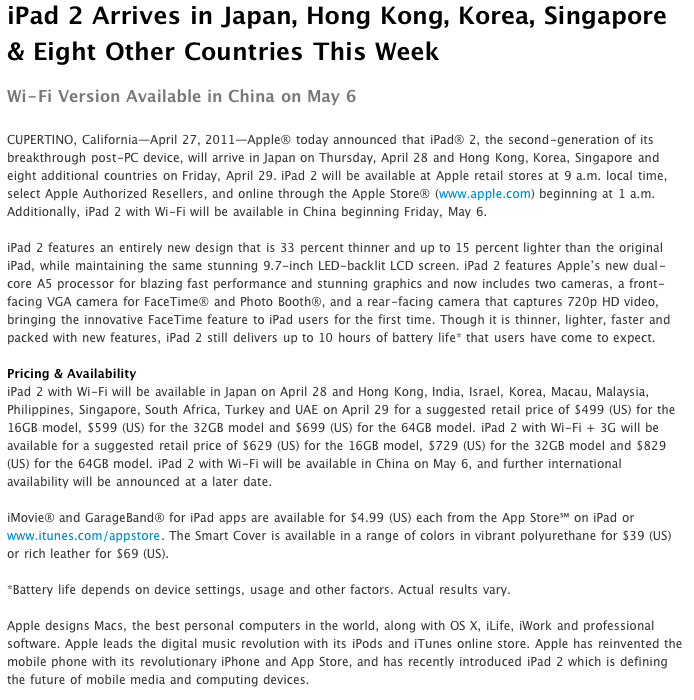
Some information came in regarding possible prices when the iPad 2 launches in Singapore next Friday, 29th April 2011.

16GB $668

32GB $798

64GB $928

Only time will tell if they are accurate, but if they are, it will represent quite a major drop from the original pricing for the iPad 1 when it launched in Singapore last July, for the original 16GB wifi set cost $728, and will also put it in line with my previous information that the 16GB wifi will launch with a price between $650 to $690.

When is the iPad 2 launching in Singapore?

Chatter and whisperings for the past 30 days point to 29th April 2011 as the day us Singaporean mortals will finally be able to buy the magical device from a local store.

More chatter also enlightens us to the fact that the cheapest wifi model will start at a price lower than the original $728 the original 16GB wifi iPad launched with last year, most likely between $650 to $690.

I will be at my favourite iPad Launch Day queueing location as usual this year.